How Enonic’s Headless SaaS CMS Fits into Microservices
Connect Enonic’s managed headless CMS to your business services, extend it with integration apps, and keep editors in control of content.
Written by Morten Eriksen on
In software architecture, microservices organize functionality into separate services with defined responsibilities and interfaces. A commerce service might handle purchases, a customer service might manage account data, and a headless CMS might supply editorial content.
Well-defined services can be developed, upgraded, and scaled independently. This can help teams deliver changes at their own pace, but it also introduces work around network calls, data consistency, monitoring, and service ownership.
Enonic fits into this architecture as a headless CMS delivered as SaaS. It manages structured content and the editorial experience, while APIs connect that content to your front ends and other services. You can also extend Enonic with integration logic, custom APIs, and background jobs.
Connect Content with Your Business Services
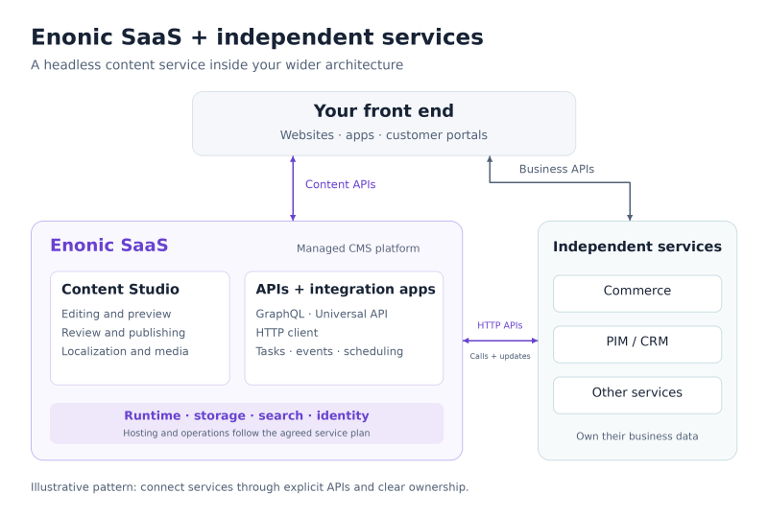
Start by giving each system a clear responsibility. Enonic can own editorial content such as product descriptions, guides, campaign pages, and media. Your commerce, CRM, or product information management (PIM) services can continue to own their respective business data.
For example, a product page could combine descriptions and images from Enonic with current prices and stock levels from a commerce API. A Next.js front end or a backend for that front end can bring the responses together. Editors maintain the content, while the commerce service remains responsible for transactions.
Enonic can also call external services. An integration app can use the HTTP Client Library to retrieve data, and a custom API or GraphQL extension can make the result available to clients. Keep credentials on the server and plan for timeouts, caching, and unavailable dependencies.
Integration works in the other direction too. A PIM service could send updates to an authenticated custom endpoint in Enonic, where your code validates the request and uses the server-side Content API to update draft content. Review and publishing rules should be part of that integration.
Enonic Apps Extend the Content Platform
Enonic apps package functionality that runs on the underlying XP platform. They can contribute content schemas, APIs, editorial extensions, event listeners, and scheduled tasks, with access to platform services such as storage, search, and identity management.
Apps can be installed, updated, started, and stopped individually. However, multiple apps can share the same XP runtime and platform resources. App modularity therefore does not, by itself, provide the process isolation or independent resource scaling of separately deployed microservices.
Use apps for integrations closely connected to content. For instance, a publishing event could trigger a task that notifies an external search service. XP’s internal events are best effort rather than a durable message queue, so business critical synchronization needs appropriate delivery, retry, and reconciliation mechanisms.
Build Integrations with Familiar Developer Tools
The Enonic CLI, local sandboxes, and starter projects help developers build and test apps before deploying them. The Enonic Development Kit documents the platform’s TypeScript and JavaScript development model, APIs, and tooling.
A web developer can use these tools to add content models, custom endpoints, or integration logic. In XP 8, the Universal API framework lets an app expose HTTP endpoints with explicit mounting and access rules. Your front end and external services can consume those endpoints without using the same programming language as the CMS.
Build, test, and deploy apps through your CI/CD pipeline using the CLI and Management API. Treat deployment as a process to design: manage environment configuration and credentials, test API compatibility, and plan how to recover from a failed release.
Store and Search Content with Clear Ownership
Enonic includes a document-oriented NoSQL data store with integrated indexing and search. It supports repositories, versioning, permissions, queries, and aggregations, giving content and integration apps useful capabilities without assembling a separate storage stack.
Keep ownership clear across services. Store editorial content in Enonic and expose the information other systems need through controlled APIs. Where you copy external data into the CMS, define which system is authoritative, how updates arrive, and how inconsistencies are resolved.
Read more about repositories, permissions, indexing, and data management in the storage documentation.
Use SaaS Alongside Your Existing Services
With Enonic SaaS, Enonic operates the CMS platform so your team can focus on its content and integrations. You can start with the developer quickstart and evaluate the platform before agreeing on the production capacity, support, and service levels you need.
Your other services can run in Kubernetes, serverless environments, or separate SaaS products. They connect to Enonic through APIs, so choosing a managed CMS does not require moving every service into the same runtime or operating your own CMS cluster.
Secure each integration according to its purpose. Apply access controls to custom APIs and content, validate incoming requests, and use appropriately scoped credentials. Keep management access for deployment and administration separate from the APIs used by customers and public front ends.
Agree on operational responsibilities across the complete solution. Enonic handles the managed platform; your team remains responsible for custom application behavior, external integrations, and front end services. Backups, availability, support, and capacity should match the agreed SaaS plan.
Give Editors Control in a Headless Architecture
Enonic brings a ready to use CMS and editorial interface, Content Studio, into your service architecture. Editors can organize, localize, review, and publish content while developers choose how websites, apps, and portals consume it.
Headless delivery can also support preview and visual page composition when the front end is integrated with Content Studio. This gives editors control over the experience while content, commerce, and other business capabilities retain clear boundaries. The illustration shows one possible arrangement:
Choose Sensible Service Boundaries
Enonic is a useful home for content models, editorial workflows, and related integration logic. Workloads that require a different runtime, dedicated compute resources, or independent scaling may fit better in a separate service. Choose boundaries around business responsibilities and operational needs, rather than turning every function into a microservice.
Organizations working with traditional infrastructures can use the same API based integration principles. Enonic’s open source platform is also available as software for organizations that need to manage their own deployment. SaaS provides the managed option while preserving the ability to extend and integrate the platform.
***
Microservices let you choose specialized capabilities for your digital experience. Enonic supplies the managed headless CMS: structured content, editorial tools, and APIs, with room for custom integration logic. Start with a practical journey—such as combining product content with live commerce data—and prove how the services work together before expanding.
To explore the implementation options, read the Enonic Development Kit documentation and the underlying platform’s deployment strategies.
First published 18 September 2019, updated 30 October 2026.